AI visibility tracking, prompt by prompt
Ask ChatGPT, Gemini, Perplexity, Claude and Google's AI Overview the questions your buyers ask, see who gets named and cited, and know the price before a single call goes out.
- Closed beta
- free
- your own DataForSEO key
Checks five engines
- ChatGPT
- Gemini
- Perplexity
- Claude
- Google AI Overviews
At a glance
Five engines, one grid
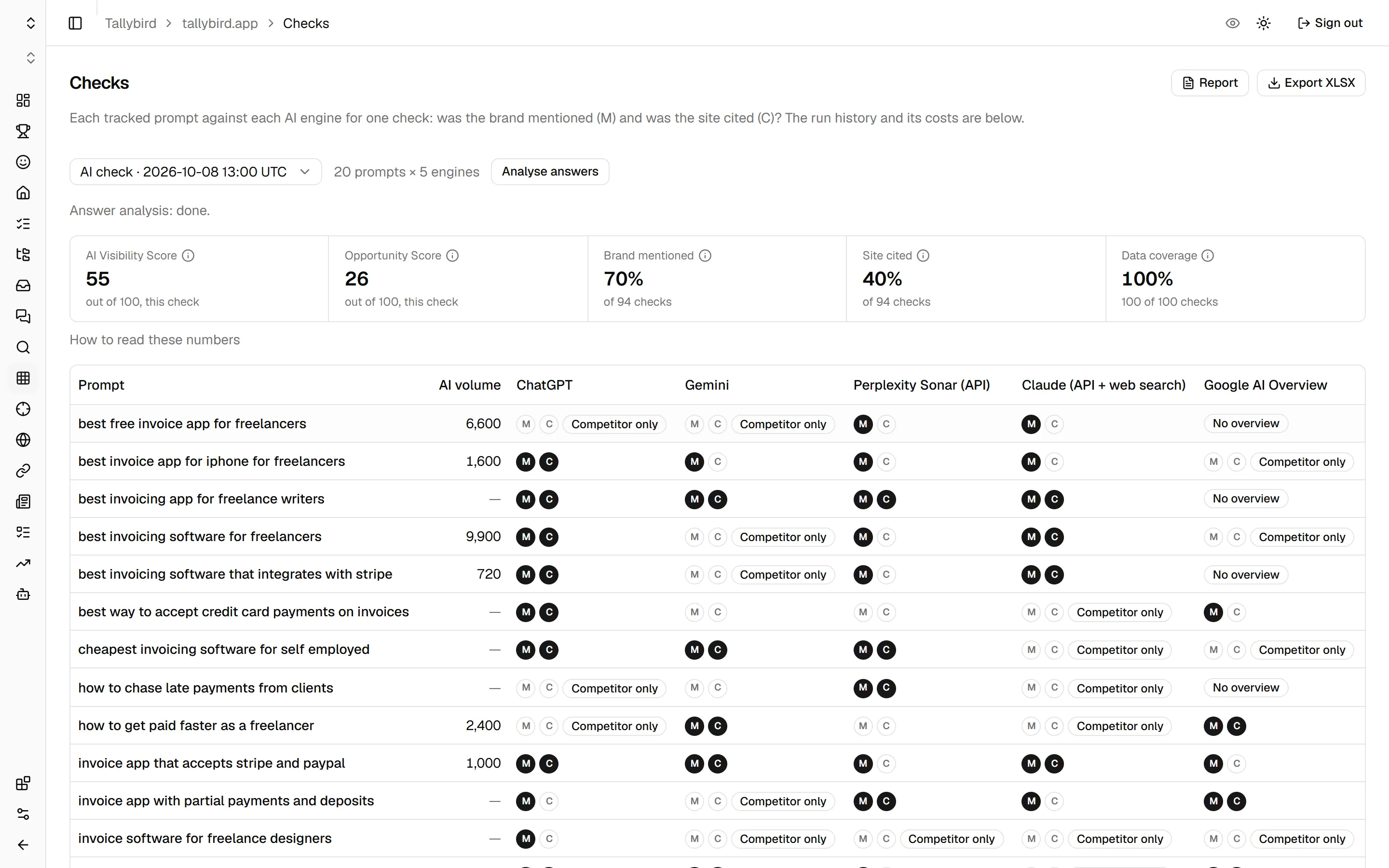
Every engine asked the same prompts, side by side.
A quote before every run
Nothing goes out until you confirm the estimated and maximum cost.
Every answer on file
Brands in order, links, searches and the raw response.
Re-checks within a cap
Daily, weekly or monthly. Off until you switch it on.
Ranges, not noise
Changes inside the likely range are greyed out.
Missing is not a miss
A missing answer counts as unknown, never as a miss.
One check, a hundred answers
AI visibility tracking, the way I built it, is simple: you pick prompts and engines, the app asks every engine every prompt, live, and keeps what comes back. Twenty prompts on five engines is one check of 100 answers.
The Checks page lays a check out as a grid: M where the brand was mentioned, C where the site was cited, and a mark where only a competitor got named. Above it sit the AI Visibility and Opportunity scores, the share of answers that named you and that cited you, and data coverage: how many planned answers actually arrived. The sample report shows a full one, every answer included.
Stored with every answer
- The brands it namedIn the order it named them.
- The links it usedEvery source the answer cites.
- The searches the engine ranWhere the engine reports them.
- The provider's raw responseTo check any number against the text.
Five engines, asked the way people use them
ChatGPT and Gemini are scraped from the consumer apps people use, live or queued. Queued costs about a third of the live price and takes longer.
Any OpenRouter model with search can be added in Settings, labelled "via OpenRouter". If an engine doesn't report positions or the searches it ran, the column says "not reported" instead of a number I made up.
Where each answer comes from
- ChatGPT and Gemini
- The consumer apps, live or queued
- Perplexity
- The Sonar API
- Claude
- The API, with web search on
- Google AI Overview
- The Google results page
A quote before anything runs
Every paid batch starts with a quote: prompts, engines, expected calls, the estimated and the maximum cost, and the price catalog it was priced from. Nothing goes out until you confirm, and editing the form throws the quote away.
Re-checks on a schedule, within a cap
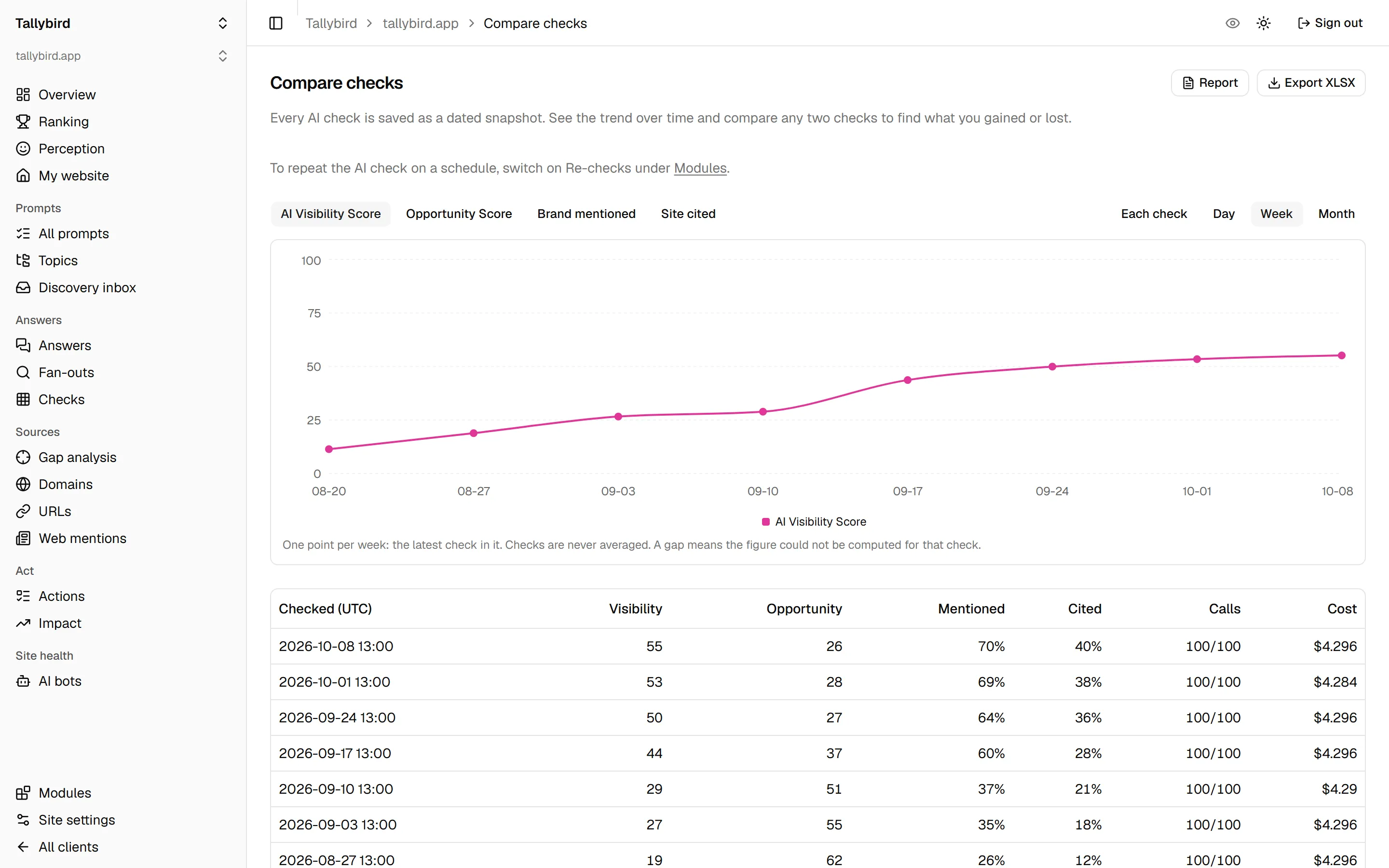
AI answers change from one run to the next, so one check is a snapshot. The Re-checks module repeats it daily, weekly or monthly within a cost cap you approve. Like every paid module it's off until you switch it on, and switching it on shows the monthly cost first.
Every check is kept as a dated snapshot. Compare checks draws the trend and puts any two checks side by side, or one against "a week before", so you see each prompt and engine you gained or lost.
Rates with a likely range
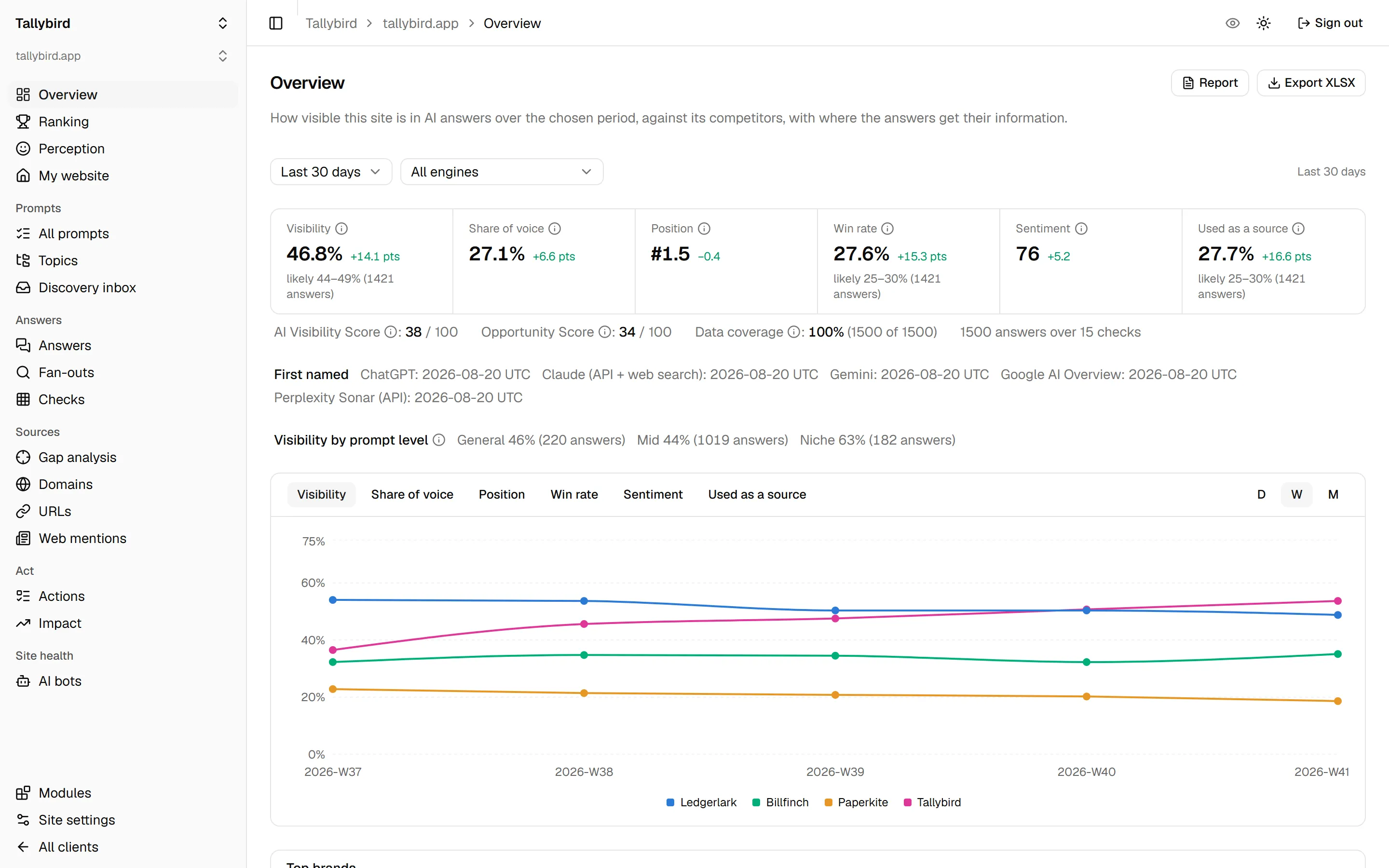
The Overview turns the answers into six rates: visibility, share of voice, position, win rate, sentiment and used as a source, each defined on the AI brand monitoring page. Visibility, win rate and used as a source carry a "likely between" range worked out from the number of answers behind them. When this period's range overlaps the last one's, the change is greyed out as normal variation, not shown as a win or a loss.
A 0% explains itself: too few answers to call it, no answer named any brand (the prompts may not ask for companies), or competitors were named and you weren't. When the latest check lost ground, the Overview says so at the top.
When a call fails
A failed call is explained in plain words on the Checks page and retried on its own. It shows whether it was charged, and a retry that might cost money asks first. Retries never duplicate answers or costs, and a failure never touches results that already finished.
Runs carry on without you: close the dialog and a progress tray keeps track. If a check's background job dies, the check is settled automatically and every answer that arrived is kept. A missing answer counts as unknown, never as "not mentioned".
What a check costs
DataForSEO's prices for one answer, as the quote estimates them.
After the run, the actual cost of every call is recorded from the provider's own figure, in micro-dollars, so fractions of a cent never get rounded away. Compare checks lists the calls and the cost of each check.
- ChatGPT or Gemini answer, queued
- $0.0012
- Google AI Overview answer
- $0.002
- Perplexity answer
- $0.0066
- Claude answer
- $0.0536
- 100 prompts a week, four engines
- about $4.77 a month
From prompt to fix list
The full walkthroughFind the prompts
Discovery, your own list or both. Keep the questions a buyer would ask.
See the quote, then run
Pick prompts and engines. Nothing runs until you confirm the price.
Get the fix list
Gaps and Actions turn the answers into pages to write and sites to get on.
Questions
How often should I re-check?
Answers vary between runs, so the trend tells you more than any single check. Weekly is a sensible start for most sites. The Re-checks module runs daily, weekly or monthly within a cost cap you approve, and it stays off until you switch it on.
Are these the answers a real person would see?
ChatGPT and Gemini are scraped from the consumer apps people use. Perplexity and Claude are asked through their APIs with web search, and the AI Overview is read from Google's results page. Every answer is stored next to the provider's raw response, so you can check any number against the text.
What does tracking cost?
You pay DataForSEO's prices for the checks you run. 100 prompts a week on ChatGPT, Gemini, Perplexity and AI Overviews is about $4.77 a month. Claude is the expensive engine at about $0.0536 an answer: 25 prompts a week on all five engines is about $7.00 a month.
Which markets can I check?
Each site has its own market and language. Live checks reach many more markets than the discovery index, which covers the US in English for ChatGPT and 94 locations for Google.
What if an engine fails during a check?
Failed calls are explained in plain words, marked as charged or not, and retried on their own. Data coverage shows planned, completed and failed answers, and a missing answer is never counted as a miss.
Get an invite.
I'm letting people in a few at a time. Leave your email and the site you'd track first, and you'll hear from me when your account is ready.
See pricing