Free AI crawler checker
Type a domain and see which AI bots your robots.txt blocks and what your server says when they knock. A blocked search crawler can't read your site for that assistant's answers.
At a glance
49 AI crawlers
Training, search and user-query bots, from your robots.txt.
Six crawlers knock
GPTBot, ClaudeBot, PerplexityBot and three more open your home page.
Your llms.txt too
Found or not, its length and its # title.
Words without JavaScript
What a crawler that runs no scripts sees.
Free, nothing saved
No signup, and no AI engine is asked anything.
Then write the rules
Two free generators write the robots.txt lines and the llms.txt file.
Three kinds of AI bot
An AI crawler checker is only useful if it tells the bots apart, because blocking them means different things. Both the free checker above and the app read your robots.txt for 49 AI crawlers. A few that fit no group are listed as Other.
Blocking training bots is a choice plenty of sites make on purpose. Blocking a search or user-query bot is a different matter: that assistant can't read your site when it builds an answer, and no amount of content work gets around it.
49 crawlers, grouped
- TrainingCollects pages to train models: GPTBot, ClaudeBot, Google-Extended, CCBot.
- SearchSearches the web for an assistant's answers: OAI-SearchBot, Claude-SearchBot, PerplexityBot.
- User queryFetches a page when someone asks about it: ChatGPT-User, Claude-User, Perplexity-User.
One rule trips people up
A crawler named in its own group ignores the rules for all crawlers completely. In this file, every crawler that isn't named is blocked, but GPTBot can read everything outside /private/, because its own group is the only one it follows.
The check shows GPTBot as partial and the rest as blocked, which is why the app's table splits named crawlers from those following the rules for all.
robots.txt
User-agent: GPTBot
Disallow: /private/

User-agent: *
Disallow: /
One status per crawler
Each crawler ends up with one of four statuses. The free check adds what your server actually answered, and flags a refusal or a bot challenge page.
How a status is decided
- Blocked
- The home page is disallowed.
- Partial
- Some other path is disallowed. A Disallow that an Allow fully takes back doesn't count.
- Allowed
- Everything else. A missing robots.txt allows everything.
- Unknown
- The robots.txt couldn't be read.
The same check, inside the app
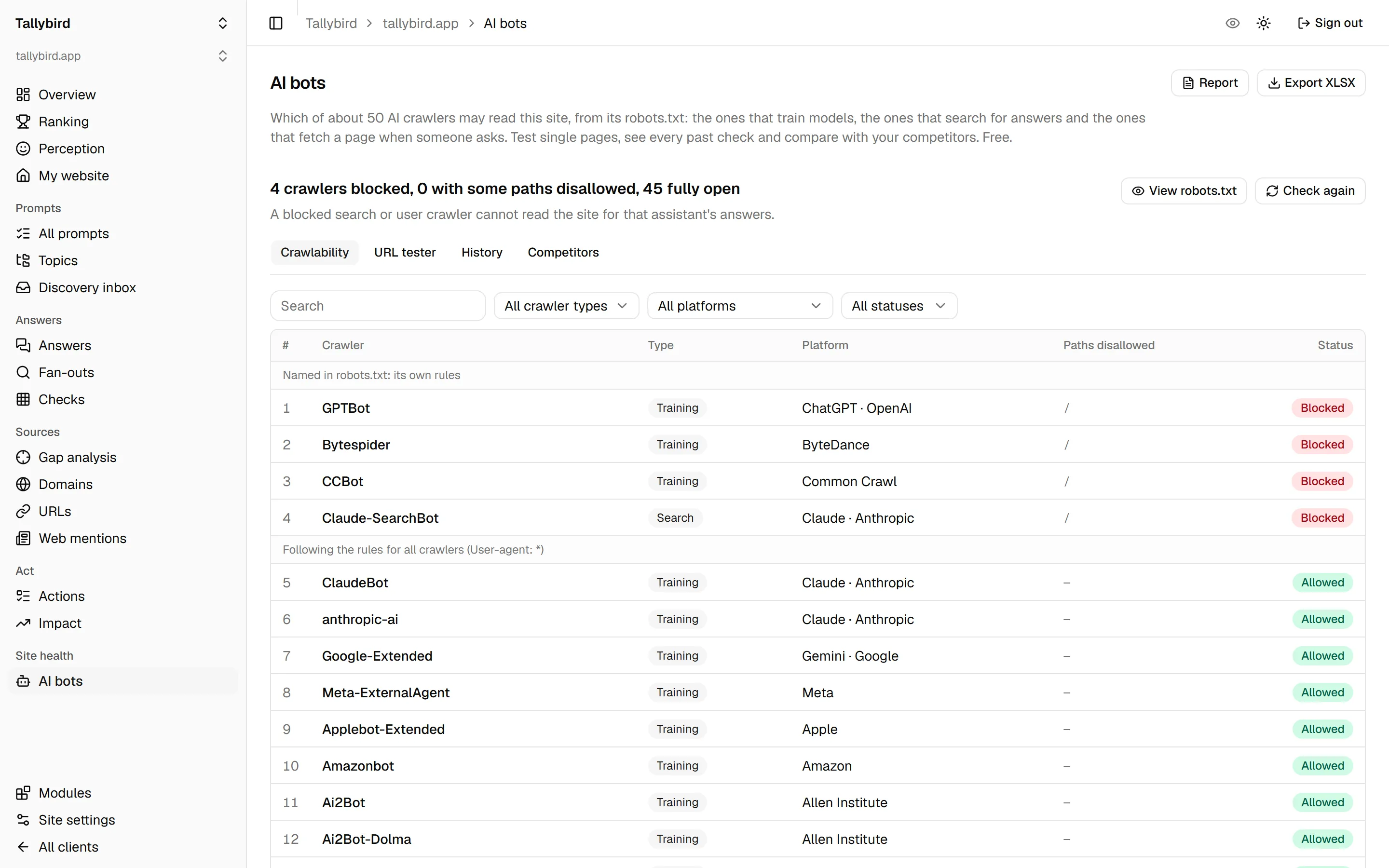
In the app, each row also shows the crawler's platform, such as ChatGPT, Claude, Gemini or Perplexity, and the paths your file tells it not to read. Filter by type, platform or status.
The URL tester checks one page instead of the whole site, for a blog, a docs section or a pricing page with rules of its own. History keeps every past check, so you see when a crawler went from allowed to blocked, say after a deploy shipped a new robots.txt.
Compare with competitors
The Competitors tab runs the same check on the competitors you track. If a rival lets OAI-SearchBot in and you block it, you've found a difference that takes one line to fix.
It works the other way too: when every site in the market blocks the same bot, access isn't what separates you.
From check to fix
A blocked search or user crawler becomes an item in Actions, the same work list that holds the content and outreach tasks from gap analysis.
I put it under Site health because it's the first thing to rule out. Once a crawler is let in, AI visibility tracking shows whether the answers start naming you, and citation tracking shows which of your pages they read. No llms.txt yet? The llms.txt generator writes one.
How the rules are read
The check follows Google's reading of robots.txt (RFC 9309). A crawler obeys the groups that name it, and falls back to the rules for all crawlers when none do.
A rule matches from the start of the path, * means any characters and a final $ means the end of the address. The longest matching rule wins, Allow wins a tie, and an empty Disallow is no rule at all.
- AI crawlers looked up in robots.txt
- 49
- Crawlers that open your home page
- 6
From prompt to fix list
The full walkthroughFind the prompts
Discovery, your own list or both. Keep the questions a buyer would ask.
See the quote, then run
Pick prompts and engines. Nothing runs until you confirm the price.
Get the fix list
Gaps and Actions turn the answers into pages to write and sites to get on.
Questions
What does the free checker on this page do?
It reads your robots.txt and llms.txt, then opens your home page as an ordinary browser and as GPTBot, OAI-SearchBot, ChatGPT-User, ClaudeBot, PerplexityBot and Googlebot, and shows what your server answered each one. It's free, needs no signup and saves nothing.
Should I block GPTBot?
That's a policy decision, and the app won't make it for you. GPTBot collects training data. Blocking it is a separate choice from blocking OAI-SearchBot or ChatGPT-User, which fetch pages for ChatGPT's answers.
Does robots.txt actually stop AI bots?
A robots.txt file is a request, not a lock. The check tells you what your file asks each crawler to do. It can't tell you whether a crawler obeys.
What if my site has no robots.txt?
Then every crawler is allowed. If the file exists but can't be read, the crawlers show as unknown rather than allowed.
Will it catch a firewall or CDN blocking bots?
The free checker above tries: it sends each crawler's published user agent and flags refusals and challenge pages. It requests from Cloudflare's network, not from the crawlers' own addresses, so a site that verifies crawler IPs can refuse it and still let the real bot in. The check inside the app reads robots.txt only.
Which crawlers are on the list?
49 of them, including GPTBot, OAI-SearchBot and ChatGPT-User from OpenAI, ClaudeBot, Claude-SearchBot and Claude-User from Anthropic, Google-Extended, PerplexityBot, Perplexity-User, Applebot, Amazonbot, Bytespider and CCBot.
Get an invite.
I'm letting people in a few at a time. Leave your email and the site you'd track first, and you'll hear from me when your account is ready.
See pricing