The AI visibility report, one page long
One page a client can read, a link they can open without a login, and a workbook with every citation in its own row for whoever wants to check the numbers.
- Closed beta
- free
- your own DataForSEO key
Checks five engines
- ChatGPT
- Gemini
- Perplexity
- Claude
- Google AI Overviews
At a glance
One page, five parts
Numbers, ranking, the latest check, sources and next actions.
A PDF or a share link
Read-only, no login, no prices.
XLSX export
Seven sheets, one citation per row.
The app's own numbers
Same stored answers, so the two never disagree.
What's on the page
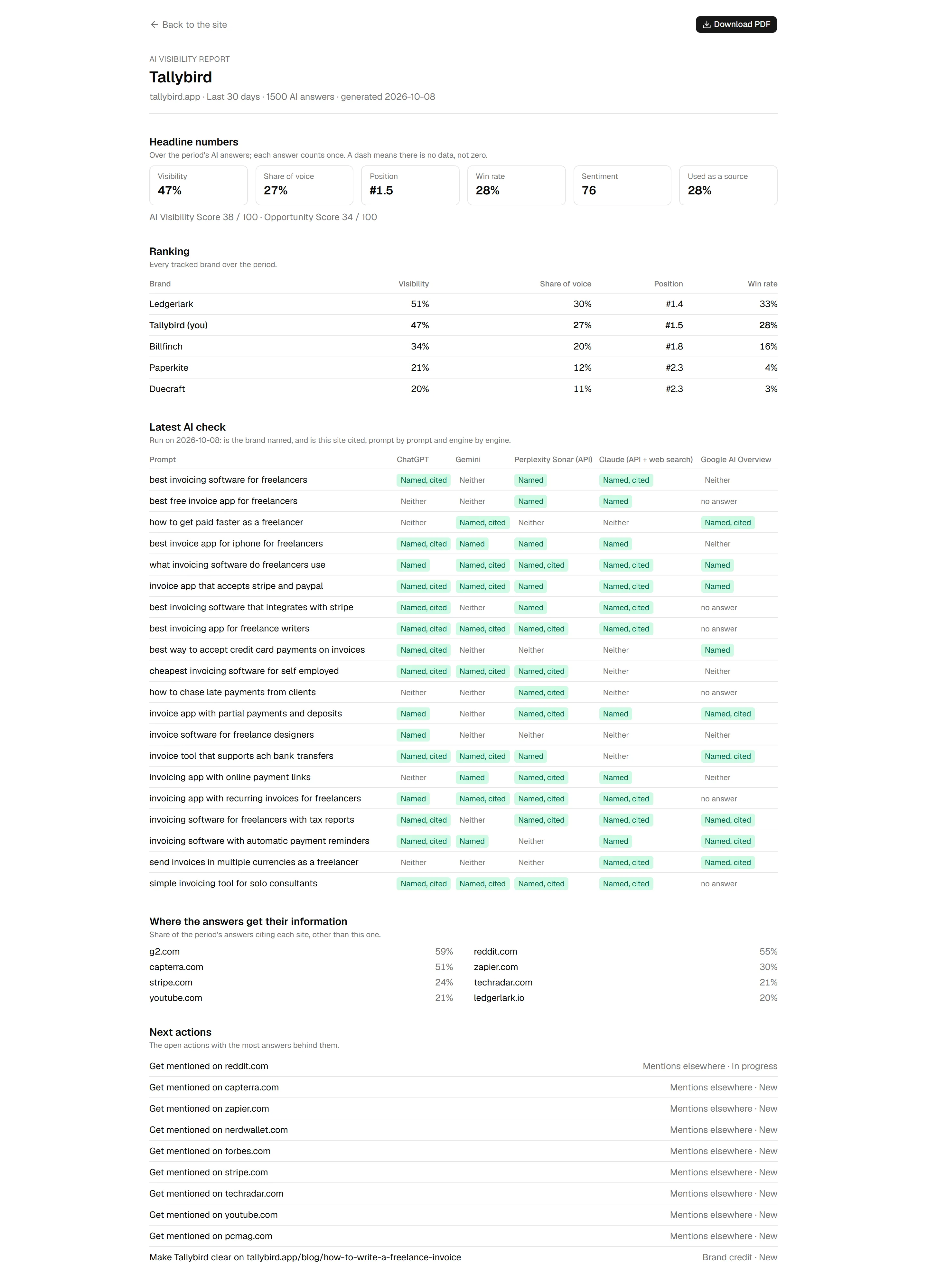
An AI visibility report has to survive being forwarded to someone who has never opened the tool. This one fits on one page, in five parts. A dash means no data, never zero.
It's built from the same stored answers as the app, so the report and the screens never disagree. The next actions are the open items of the work list that competitor gap analysis builds.
The report, top to bottom
- Headline numbersVisibility, share of voice, position, win rate, sentiment and used as a source over the period, with the AI Visibility and Opportunity scores.
- RankingEvery tracked brand over the period, with the client marked.
- Latest AI checkPrompt by prompt and engine by engine: named, named and cited, neither, or no answer.
- Where the answers get their informationThe sites cited most, other than the client's own.
- Next actionsThe open actions with the most answers behind them, with their status.
A PDF and a share link
Download PDF prints the report from the browser, so you have a file to attach to an email or drop into a deck. For clients who'd rather click, a read-only link opens the same report without a login, and you can revoke it whenever you like.
The client sees what the engines said about them, not what the check cost you or which APIs ran it.
Share link
- Login
- Not needed
- Prices and data providers
- Never shown
- Access
- Yours to revoke at any time
The XLSX export, sheet by sheet
For the people who check numbers, Export XLSX builds a workbook with seven sheets: Overview, Prompt Discovery, AI Visibility, Citations, Content plan, Answers and Fan-outs. The main ones are laid out like this:
- Overview: the client, site, market and language, prompts and engines checked, both scores, data coverage, and the top opportunity prompts, competitor brands and cited domains.
- Prompt Discovery: one prompt per row, with its topic, where it came from, AI search volume, and when it was first and last seen.
- AI Visibility: one prompt and engine per row, with whether the client was mentioned, whether and at what rank it was cited, and which competitor brands and domains appeared.
- Citations: one citation per row, with its prompt, engine, rank, domain, URL, page title, and whether it was the client's or a competitor's.
- Content plan: one topic per row, saying whether to upgrade a page or write a new one, with the current and recommended URL, a brief, priority and status.
One citation per row
The rule I care about most is one citation per row, never a comma-separated list of links squeezed into one cell. That's what makes the Citations sheet usable: filter it by engine, pivot it by domain, count how often a competitor's page shows up, all without splitting text first.
Header rows are frozen, URLs are clickable, and raw-data sheets have no merged decorative headers to fight with. The file name carries the client, the domain and the date.
One row of the demo's Citations sheet
- Prompt
- best invoicing software for freelancers
- Engine
- ChatGPT
- Rank
- 5
- Domain
- ledgerlark.io
- URL
- https://ledgerlark.io/features/invoicing
- Page title
- Invoicing
- Client or competitor
- Competitor
Built for client work
One workspace holds as many clients as you like, each with as many sites as you like, and every site gets its own report. The Report and Export XLSX buttons sit at the top of every site page, so a report is one click from wherever you are.
If the client is still a prospect, the AI visibility audit walks through the afternoon that ends with this report. Reports and exports cost nothing during the closed beta; you pay DataForSEO only for the checks behind them, as pricing explains.
Every number can be checked
Sooner or later a client asks where a number came from. Every rate in the app says how many answers it rests on, and every answer is stored with the provider's raw response.
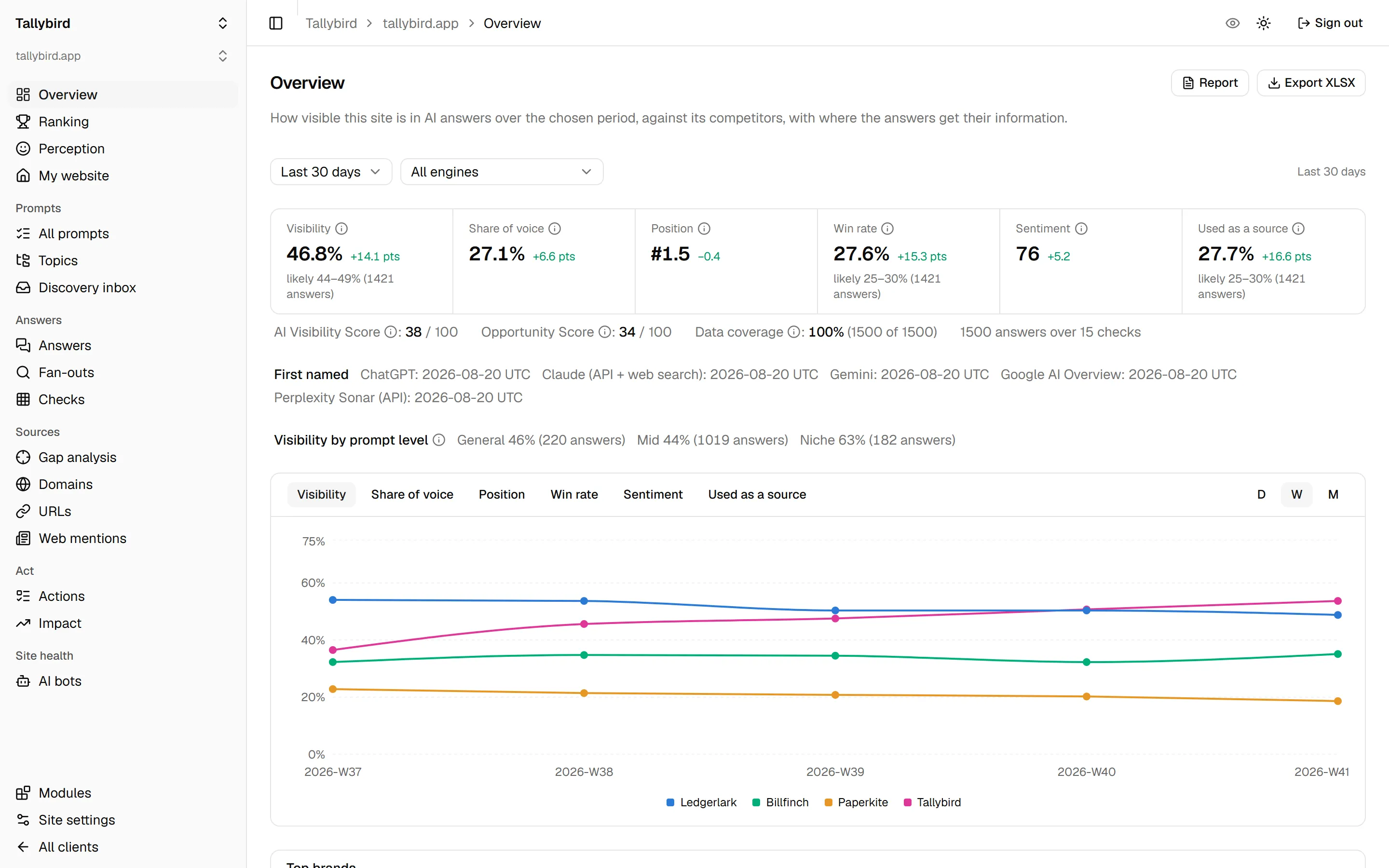
When a client asks why a number moved, open the Overview for the same period and follow the number back to the answers behind it. Citation tracking explains where the report's sources come from.
From prompt to fix list
The full walkthroughFind the prompts
Discovery, your own list or both. Keep the questions a buyer would ask.
See the quote, then run
Pick prompts and engines. Nothing runs until you confirm the price.
Get the fix list
Gaps and Actions turn the answers into pages to write and sites to get on.
Questions
Does my client need an account to see the report?
No. The share link opens a read-only copy without a login, and you can revoke it at any time.
Will the client see what the checks cost?
No. Shared reports show no prices and no data-provider names.
Is there a Google Sheets export?
Not directly. The XLSX opens in Google Sheets, and with one citation per row it filters and pivots without any cleanup.
Get an invite.
I'm letting people in a few at a time. Leave your email and the site you'd track first, and you'll hear from me when your account is ready.
See pricing